How to estimate calories and macros for a recipe you’ve saved
Get approximate calories, protein, carbs and fat per serving, alongside the recipe you actually cook.
On this page
Quick answers
Does it work for recipes I typed in myself?
Yes. Saved recipes, including ones you entered by hand, can request an AI estimate from their Nutrition details. Check the ingredients, amounts and method first.
Can I request a new AI estimate offline?
No. Requesting an AI estimate needs an internet connection, the required service access and permission to process the recipe. Some later quantity adjustments are handled on your device.
Why does my estimate look off?
Check the servings and assumptions, especially any uncertain ingredient amounts. Correct supported estimated amounts where available. If the recipe text is wrong, edit the recipe and check whether it needs a new estimate.
The short answer
Save the recipe in Orzella, check it against the original, then open its Nutrition row. If there's no estimate yet, tap Estimate. Orzella can provide approximate calories, protein, carbs and fat per serving, with the assumptions shown. Check the serving count and any unclear amounts alongside the result.
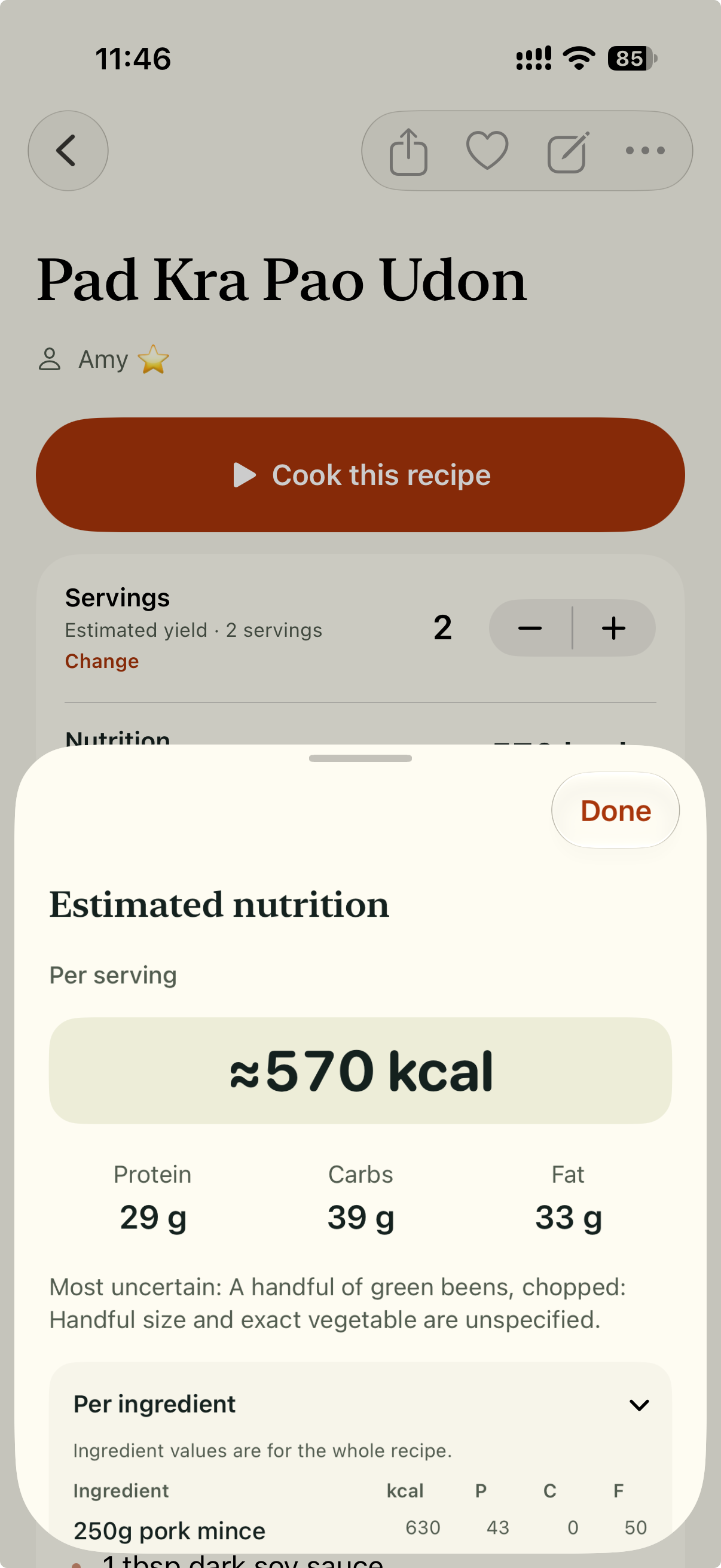
Estimated calories and macros per serving, with a note about an uncertain ingredient.
Keep the numbers with the recipe
Most recipes you cook again don't come in tidy form. You might have a blog post with a long story above the ingredients, a social caption that says "a big handful of spinach," a photo of a printed card, or notes you typed yourself.
When the recipe is already saved, retyping its ingredients just to get a rough nutrition picture is a chore. You want to know roughly what is in a bowl of the dish you already cook.
Orzella works the other way round. It keeps the recipe first, the version you'll cook from, search for and come back to. Nutrition is an estimate attached to that recipe, so the numbers stay with the dish instead of living in a separate app.
Step 1: Save a version you'd actually cook
Orzella can import from eligible website text, the written captions or descriptions of public posts on supported social platforms, readable photos, and pasted recipe text. It doesn't transcribe video or audio, so if a recipe only exists as something said aloud in a clip, type or paste it in yourself.
Before you save, compare the ingredients, amounts and method with the source. A missed amount of butter or a misread cup measurement changes what the estimate is based on.
Saving new recipes requires paid access.
Step 2: Open Nutrition and tap Estimate
Some recipes imported with AI already include a nutrition estimate. For other saved recipes, including ones you entered by hand, open the recipe and find its Nutrition row. If nothing is there yet, choose Estimate.
Requesting an AI estimate needs an internet connection and the required account and service access. Follow any sign-in or subscription prompt, and choose Allow if asked for processing permission. The recipe’s ingredients and method pass through OpenRouter and OpenAI for the AI estimate. Some later quantity adjustments are calculated on your device.
Orzella privacy notice: nutrition estimates
If something goes wrong along the way, Try again appears where it's relevant.
Step 3: Read the numbers the right way
The details show estimated kcal, protein, carbs and fat per serving. Below that, ingredient contributions refer to the whole recipe, not a single portion.
That distinction is useful. If the per-serving fat seems high, the ingredient list can show which item is responsible across the whole dish. Then you can decide whether that matches how you actually cook it.
Step 4: Check the assumptions
Recipes are full of gaps: "salt and pepper to taste," "a drizzle of oil," "serves 4–6," or no serving count at all. Where servings or amounts are unclear, Orzella may estimate them and show you the assumption.
Read How this was estimated to check the assumptions. The sheet can also identify the most uncertain ingredient. For example, it might flag the vaguely measured oil in a traybake, or a "handful" of cheese. Where it's supported, you can correct an estimated ingredient amount to match what you really use.
Start with the unclear amounts. If the ingredient text itself is wrong, correct the saved recipe too.
Step 5: Get servings right
Per-serving numbers are only as meaningful as the serving count. If a recipe says it serves six but your household gets four portions from it, each portion holds more than the original count suggests. Check the serving basis shown with the estimate, and correct the recipe’s yield in Edit recipe if needed.
Choosing a larger cooking batch is separate from checking the yield of the saved recipe. Review the base recipe and its estimate together.
When to re-estimate
If you edit ingredients, the estimate may refresh by itself, depending on the processing permission you've granted. In other cases, use Re-estimate nutrition. A title or personal-note change does not request new nutrition numbers. Use Edit recipe when changing the recipe itself, then check whether its estimate needs updating.
What these numbers are good for
Use the result as a rough picture of a dish you cook often. Keep the serving basis and any estimated amounts in mind when comparing recipes.
Values will vary with brands, how you prepare things, and any amounts that are missing or vague. Recipe estimates are approximate. They do not replace measured nutrition information or individual dietary advice.
Keep the recipe and its estimate together
Bring a recipe you cook often into Orzella, check it against the source, and open Nutrition. Its ingredients, method, your own notes and a rough sense of what is in each serving can stay together for the next time you make it.
Saving new recipes requires paid access. Recipes you've already saved stay available on this device.