How to cook from a saved recipe and change the servings
A saved recipe is only useful if it holds up when the oven is hot and your hands are messy. Here is how to cook from one calmly, scale it for more people, and leave yourself better notes for next time.
On this page
The short answer
Open the recipe in cooking view and set the servings you need. Supported ingredient amounts adjust; cooking times and oven temperatures stay as written. Keep the ingredients close while you follow the steps and give timers useful names. Before shopping, check the list against the version you will cook; after dinner, leave yourself a note for next time.
A real-world example: the traybake that has to feed eight
Say you have a chicken and potato traybake you love. It serves four, and on Saturday you have eight people coming. Doubling it in your head is where things usually go wrong. You miss the lemon, you guess at the oil, and you lose track of which tray went in first.
In Orzella you open the traybake, change the servings from four to eight, and the supported quantities double for you: chicken thighs, potatoes, olive oil, garlic. Lines like 'salt to taste' or 'a handful of parsley' have no number to scale, so read those and decide for yourself.
What changes when you scale, and what doesn't
Ingredient amounts scale. Time and temperature stay as written, and that is deliberate. A recipe that says 200°C for 45 minutes still says 200°C for 45 minutes when you double it, because physics doesn't scale neatly. Eight servings will probably mean two trays, and two crowded trays often roast more slowly than one. Treat the written time as a starting point.
- Keep the oven temperature as written unless you have a good reason to change it.
- Start checking at the original time, then keep going until the food is properly cooked.
- For baking, think twice before scaling. A bigger cake usually needs a different tin, and that changes everything else.
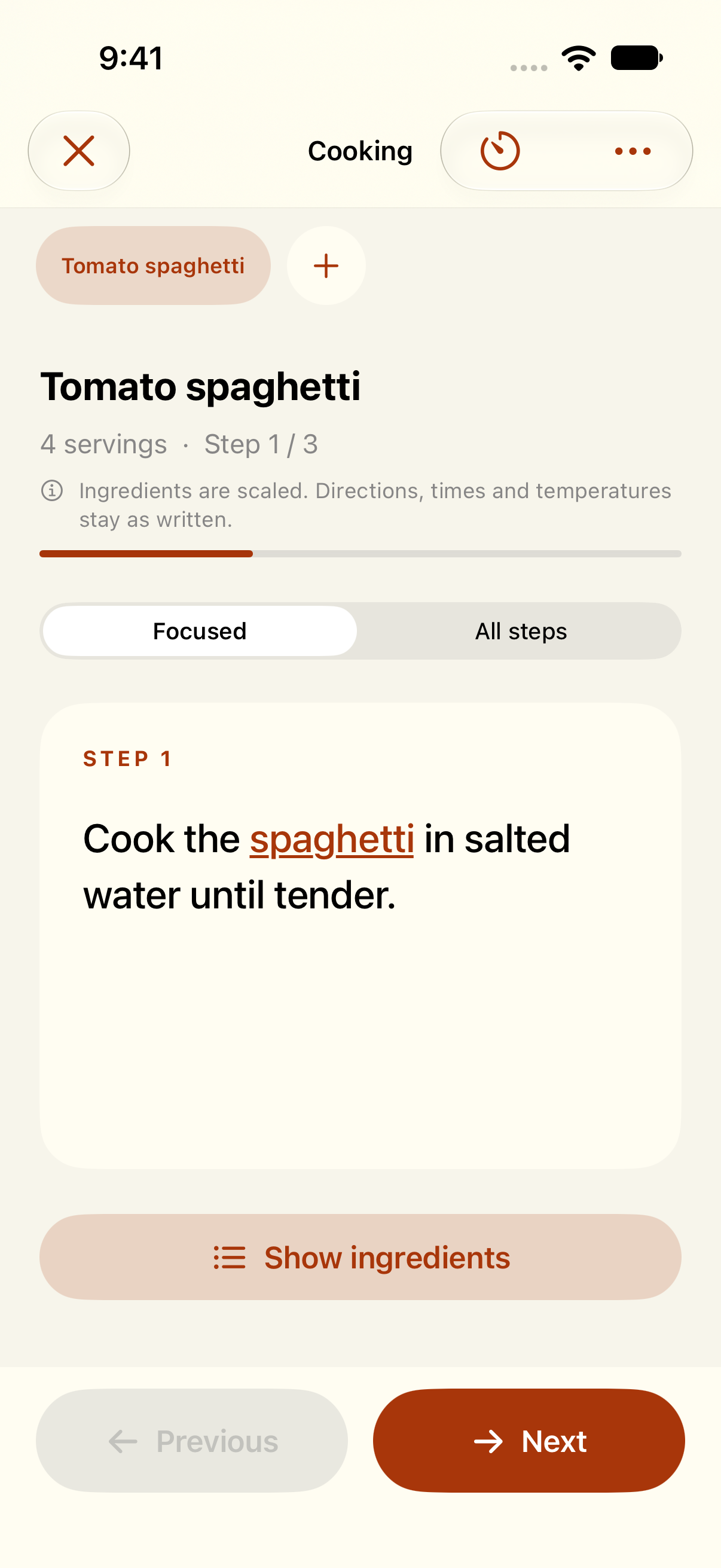
The sample recipe is set to four servings, with step 1 of 3 in focus. Ingredients are close at hand, and the screen reminds you that directions, times and temperatures stay as written.
Sample recipe shown in Orzella.Timers that tell you what they're for
Give each timer a useful name, such as Potatoes in, Add chicken or Swap shelves. The label tells you what you were tracking when you return to the cooking view.
Keep the method in view and open the ingredient list when you need it. On a wider layout the ingredients may sit alongside the steps; on iPhone you can bring them up as you go.
Notes are where the recipe becomes yours
The most useful line in any recipe is often the one you write yourself. After the meal, add a quick personal note while you still remember, for example: 'Two trays needed extra time; swap shelves halfway. Use more lemon.' The next time you cook it, for four or for twelve, that lesson is right there.
You can also edit the recipe itself. If the original said 'a medium onion' and you always use two, change it so the recipe matches how you really cook.
Your shopping list updates when you tell it to
Shopping lists do not silently follow every recipe change. Set the servings before adding the traybake’s ingredients. If you later change the recipe, servings or plan, review the list and adjust it to the meal you will cook. For a planned meal already linked to the list, use Update when it is offered.
- Set the servings you're actually cooking for.
- Make any edits to the recipe.
- Add the ingredients you need. If the recipe is already on the list, check and adjust those items before adding another copy.
- Check the list before you head out.
Start with a recipe worth cooking again
All of this works best when the recipe is clean to begin with. If you're saving from a website, a photo or pasted text, open the saved recipe once and check it against the source before cooking day, and fill in anything that is unclear or missing.
Orzella is built for the moment you go from 'I saved this somewhere' to dinner on the table. You get amounts that scale, timers that make sense and notes that make the dish better each time. Bring in the recipes you love and enjoy cooking them.
Saving new recipes requires paid access. Recipes you've already saved stay available on this device.